Lab report software that makes reports look like your lab
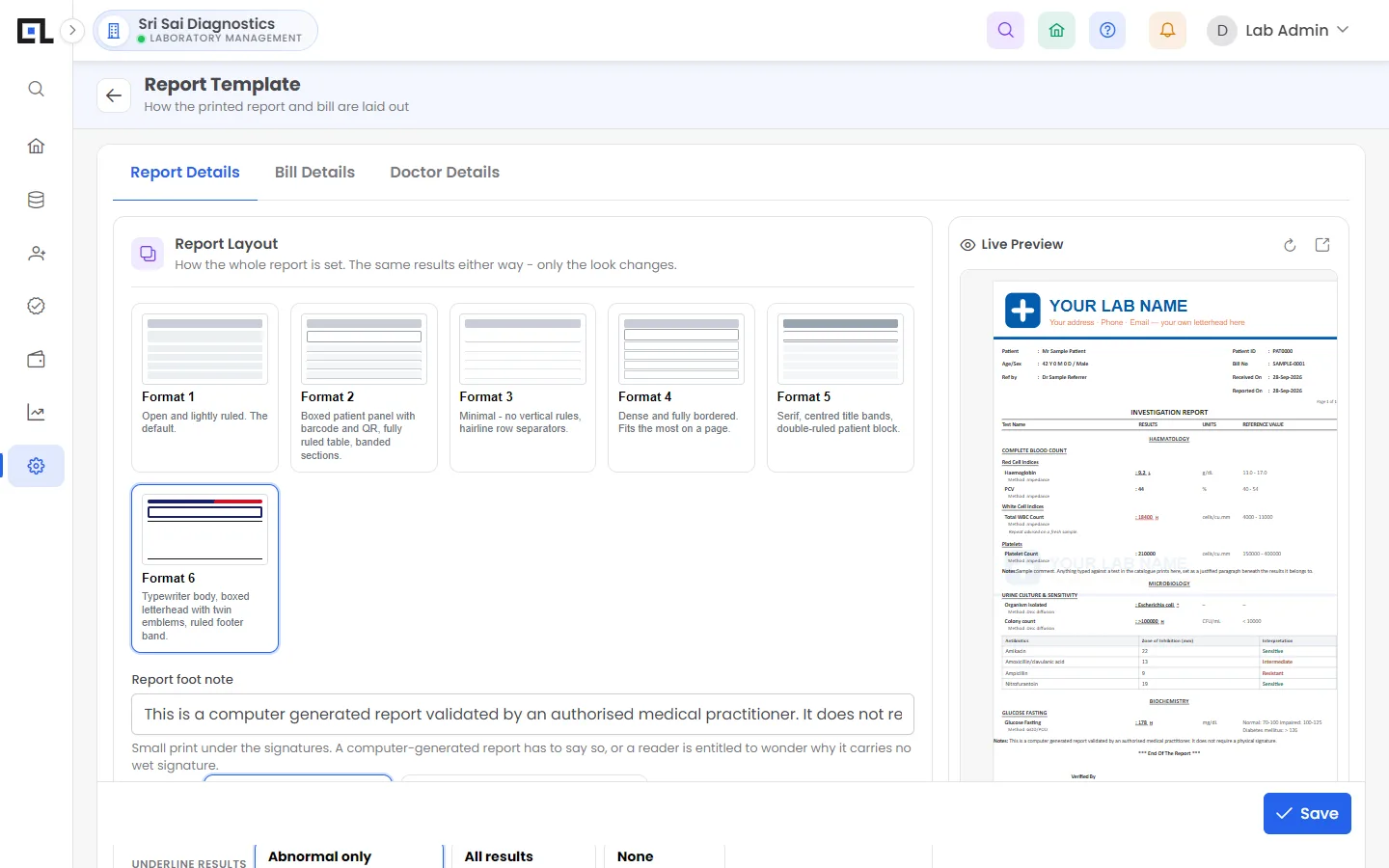
QLab prints pathology reports in six layouts with a live preview. Add your logo, letterhead, pathologist signatures and footer, print on plain or pre-printed paper, and every report carries a QR code and barcode so anyone can verify it. Abnormal values are highlighted automatically and reports download as PDF.
Updated 2026-11-21
What can you do with QLab lab reports?
Six layouts
Pick the format closest to your current report and fine-tune it with live preview.
Letterhead or plain
Print on pre-printed letterhead, or let QLab print the header and footer.
Signatures
Pathologist and technician signatures per department.
QR code verification
A QR code on each report opens the original online, so tampered copies are easy to spot.
Abnormal highlights
Out-of-range values are bold or underlined as you prefer.
Print test-wise
Print only completed tests now and the rest later, or all together.
Frequently asked questions
Can QLab copy my existing report format?
In most cases yes. One of the six layouts plus header, font and spacing settings usually matches an existing report; Qubha helps during setup.
Are reports available as PDF?
Yes. Every report and bill can be downloaded as a PDF and shared on WhatsApp or email.
See QLab running on your own tests
Free 30-minute demo over video call or at your lab. Setup, data migration and training are included in every plan.